
Features

Monitor Sitemaps and Save Every Version

Signalio checks the sitemaps you choose on a schedule, captures the URLs in each one, and saves every version so you can compare runs or open an earlier one.

Features

Empowering Teams Grow Fast

Signalio checks the sitemaps you choose on a schedule, captures the URLs in each one, and saves every version so you can compare runs or open an earlier one.

What it does

Overview

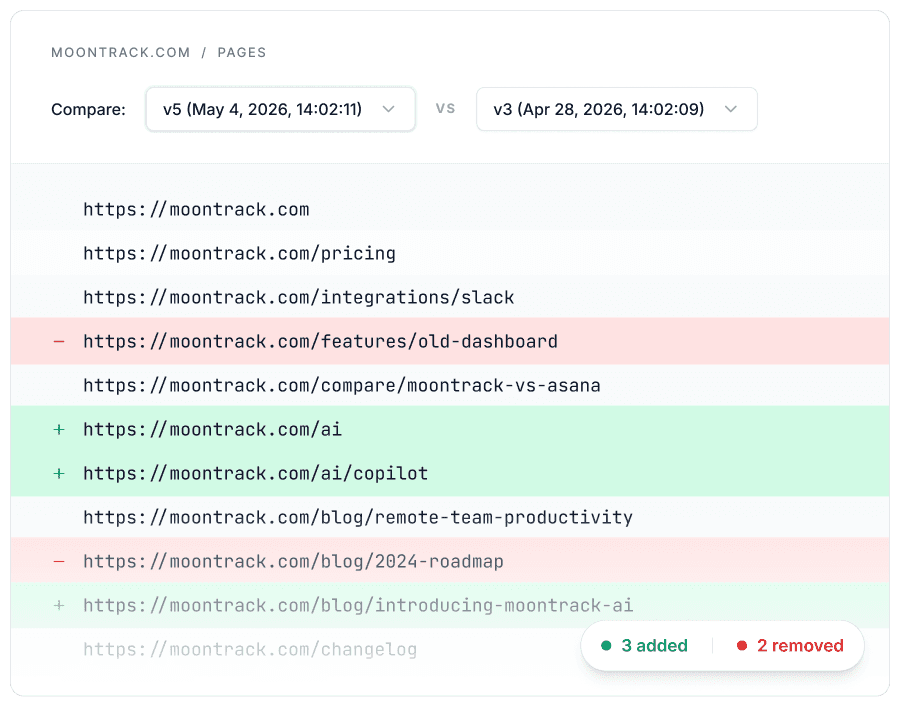
Signalio agent checks the sitemaps you choose on a set schedule and captures the list of URLs in each one. On every run it records what is in the sitemap and compares it to the run before, so you can see which URLs were added or removed.

Every capture is saved as its own version in your Signalio database, so nothing is overwritten and you can open any past version or compare two of them whenever you want.

Built for SEO and content teams, in-house or at agencies, who keep track of what competitors publish, and it answers your questions through Claude over MCP.

Key benefits

  • Check sitemaps automatically on the schedule you set.

  • See which URLs were added or removed between two runs.

  • Notice when a URL is removed from a sitemap, so you can look into it yourself.

  • Watch multiple sitemaps, across multiple sites, in one workflow.

  • Save every capture as its own version, with nothing overwritten.

  • Open any past version to see what a sitemap contained on a given date.

  • Ask Claude about any tracked sitemap using your saved data.

How to set this up

  1. Add the sitemap URL. It is usually at /sitemap.xml. Add as many sitemaps as you want to the same workflow.

  2. Set how often it runs. The workflow defaults to once every 3 days. Change it to match how closely you want to watch.

  3. That's it. The agent already has the instructions it needs and starts capturing each sitemap on schedule.

What you'll get

Overview

On each run, the agent captures every URL in the sitemap and notes what changed since the last run. Each capture is saved as its own version in your account, so your full history stays available. Open any past version to see what a sitemap contained on a specific date, or compare two versions to see which URLs were added or removed.

Outputs

  • MCP for Claude. Ask questions in plain language and get answers pulled from your tracked sitemaps.

  • JSON. Clean structured output for any tool or pipeline.

  • Google Sheets. Send captures straight to a sheet your team already works in.

Ready to Start Monitoring Your Competitors?

Ready to Start Monitoring Your Competitors?

Ready to Start Monitoring Your Competitors?

© 2026 Signalio. All rights reserved.

© 2026 Signalio. All rights reserved.

© 2026 Signalio. All rights reserved.